Itz My Website!

Blog Archive

Showing posts with label face book. Show all posts

Sunday, August 22, 2010

The Fail Whale New Facebook Ascii Art Picture Meme

This is the new meme craze sweeping facebook – the fail whale! It is an ascii picture which looks like a whale animal and has the text ‘fail’ on it. You can post the fail whale on people’s statuses as a comment or on people’s walls as a wall post. You can not post it as your own status as it will not display correctly. The fail whale is already taking over facebook pages and profiles as people are spamming the fail whale everywhere! Be the first of your friends to post the fail whale!

Follow the instructions to spread the funny fail whale ascii picture on facebook!

  1. Highlight all of the text and picture of the whale below
  2. Press Ctrl+C or right click and press Copy
  3. Go to Facebook and find a status to comment or someone’s wall to post on
  4. Press Ctrl+V or right click and press Paste


The fail whale!

▄██████████████▄▐█▄▄▄▄█▌
██████▌▄▌▄▐▐▌███▌▀▀██▀▀
████▄█▌▄▌▄▐▐▌▀███▄▄█▌
▄▄▄▄▄██████████████▀


Random Fun & Awesome Status Update Ideas To Impress Your Friends

If you want to post an awesome facebook status update that will get your friends attention and get them to comment on it and like it – try using one of these random fun statuses to impress your friends! Copy and paste some silly statuses, stupid status ideas, good status updates, best statuses and more hilarious status update ideas for your facebook profile!

-you know what’s scary? I just added the squirrel I met today on Facebook.

-They say to dream big but did they say for how long?

-I don’t care what you say about me. It’s what you’re not saying that I care about.

-A pessimist is very optimistic that they won’t be able to find their glass.

-I’m a little bit drink.

-Because I don’t like you.

-Single and looking forever.

-If you admit when you’re wrong then that counts as being right… so basically, I’m always right.

-is very good at giving out directions. I just don’t like hearing yours.

-My status is allergic to you.

-Married and looking forever.

-Can you tell me which way to the yellow brick road?

-No bikes allowed on my statuses.

-I just lost my best friend… to Facebook.

-To be clever can be difficult without caffiene.

-I don’t know what you’re talking about… I didn’t steal your status.

-Who can really hear themselves thinking?

-Do not disturb.

-Great….my dog just sat on my status.

-I never said my status ideas were brilliant.

-The weekend went by and I don’t remember any of it. That’s a good thing right?

-Thank goodness it’s Monday! umm… who said that?

-Sometimes I care but most of the time…..I just don’t.

-I can’t take candy from strangers but definitely from facebook friends.

Thursday, August 5, 2010

Add animation into your FaceBook status

This is not about Instant Messaging, Its about Animation Emoticon in Your Facebook Status Message. Officially, Facebook Status didn’t support Animation Emoticons in Status Message, only in Chat Service Facebook had Facebook Chat Emoticons. But don’t worry, by using Facebook App (Application) that built unofficial you can use Emoticon Animation (gif) in your Facebook Status, called as Facade.
You want to use Emoticon likes this banana (banana), this gun pistol (gun), this love (love struck) and this run running (run). And then the Emoticons would appears in Your Facebook Status like this one:
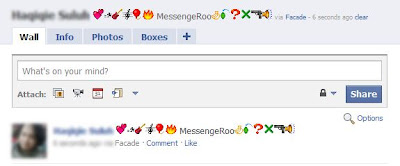
Emoticons in Facebook Status Facade
How to Use Facade Facebook Status Emoticon
Emoticons in Facebook Status on Dashboard Facade

Simply go to the Official Facade Page or Text Effect on FaceBook and the click “Go to Application” the “Login” and “Allow” the application, now the Application would ready to be used! You can also post animated message to your friend's wall.
Enjoy your FB Emoticons in Status Message. If you want to use Facebook Chat Emoticons just visit here.
Little Help Tutorial: If you saw a blank page after you click go to the application, you need to click “Login” button on the top left of the page application then a pop up would appears asking you to allow the application or not, just press Allow. Now, just wait the application to load and Done!

Monday, July 12, 2010

See Your Status Update Stats

Have you ever wondered how many times you have updated your status on Facebook? The Facebook app Status Statistics, can tell you this and more.
The app analyzes your updates and gives you a tidy list of how many you’ve written, the average word count and how many times a day you post. In addition, it generates a graph that shows you what time of day or what days of the week you normally update.
Old statuses are also searchable via the app, so you can find that witty retort you made back in November 2009 without having to scroll back through your history.

Tuesday, June 29, 2010

Who’s On Facebook Because of You?


Facebook Invite History
Facebook now displays detailed invite history to all their users.
1. If you would like to know who all have joined Facebook because of you, go here.
2. If you would like to see a list of all people whom you have invited to join Facebook but they are yet to accept your invitation, go here.
3. If you like to know who in your friends circle has brought the maximum number of people to Facebook so far, go to facebook.com/impact.
The Facebook Invites history page also gives an option to send email reminders to friends who are yet to join the social site incase your previous invites went unnoticed or if they landed in the junk folder.

Monday, June 28, 2010

Facebook chat emoticons

Ever wondered how to do all the facebook emoticons? Now we have your answer!
Here are all the facebook chat emoticons, even the secret emoticons!
Smile   -    :)
Frown   -   :(
Wink   -    ;)
Tongue   -   :p
Grin   -   :D
Gasp   -   :O
Kiss   -   :*
Cry   -   :’(
Angry   -   >:O
Grumpy   -   >:(
Confused   -   o.O
Unsure   -   :/
Squint   -   -_-
Shades   -   8-|
Glasses   -   8-)
Chuffed   -   ^_^
Curly-Lips   -   :3
Angel   -   O:)
Devil   -   3:)
Heart   -   <3
Pacman   -   :v
Shark   -   (^^^)
Robot   -   :|]
Mr Putnam   -   :putnam:
Penguin   -   <(“)

Search Facebook Like A Pro

Not everybody knows how powerful Facebook search is. Similar to any large search engine, Facebook search has a lot of advanced options to help you search like a pro. For example if you are looking for a person named John Marsh and filter your results down to only people who are married, you can try name: John Marsh status:married. A complete list of search tips for Facebook can be found here.
Search

Insert Cool Symbols In Your FaceBook Status Updates

Do you like decorating your messenger name or personal messages or facebook status with funny ASCII symbols, or if you probably wonder where some people get so many cool (or weird) characters for their Live Messenger status, here’s a good list:

☮๑•ิ.•ั๑ ๑۩۞۩๑ ♬✿.。.:* ★ ☆ εїз℡❣·۰•●○●ōゃ ♥ ♡๑۩ﺴ ☜ ☞ ☎ ☏♡ ⊙◎ ☺ ☻✖╄ஐﻬ ► ◄ ▧ ▨ ♨ ◐ ◑ ↔ ↕ ▪ ▫ ☼ ♦ ▀ ▄ █▌ ▐░ ▒ ▬♦ ◊ ◦ ☼ ♠♣ ▣ ▤ ▥ ▦ ▩ ◘ ◙ ◈ ♫ ♬ ♪ ♩ ♭ ♪ の ☆ → あ ぃ £ ❤# @ & * ❁ ❀ ✿ ✾ ❃ ✺ ❇ ❈ ❊ ❉ ✱ ✲ ✩ ✫ ✬ ✭ ✮ ✰ ☆ ★ ✪ ¤ ☼ ☀ ☽ ☾ ❤ ♡ ღ☻ ☺ ❂ ◕ ⊕ ☉ Θ o O ♋ ☯ ㊝ ⊙ ◎◑ ◐ ۰ • ● ▪ ▫ 。 ゚ ๑ ☜ ☞ ☂ ♨ ☎ ☏ × ÷ = ≠ ≒ ∞ ˇ ± √ ⊥▶ ▷ ◀ ◁ ☀ ☁ ☂ ☃ ☄ ★ ☆ ☇ ☈ ☉ ☊ ☋ ☌ ☍ ☑ ☒☢ ☸ ☹ ☺ ☻ ☼ ☽ ☾ ♠ ♡ ♢ ♣ ♤ ♥ ♦ ♧ ♨ ♩ ✙ ✈ ✉ ✌ ✁♝ ♞♯♩♪♫♬♭♮ ☎ ☏ ☪ ♈ ♨ ₪ ™ ♂✿ ♥ の ↑ ↓ ← → ↖ ↗ ↙ ↘ ㊣ ◎ ○ ● ⊕ ⊙ ○  △ ▲ ☆ ★ ◇ ◆ ■ □ ▽ ▼ § ¥ 〒 ¢ £ ※ ♀ ♂ &⁂ ℡ ↂ░ ▣ ▤ ▥ ▦ ▧ ✐✌✍✡✓✔✕✖ ♂ ♀ ♥ ♡ ☜ ☞ ☎ ☏ ⊙ ◎ ☺ ☻ ► ◄ ▧ ▨ ♨ ◐ ◑ ↔ ↕ ♥ ♡ ▪ ▫ ☼ ♦ ▀ ▄ █ ▌ ▐ ░ ▒ ▬ ♦ ◊ ◘ ◙ ◦ ☼ ♠ ♣ ▣ ▤ ▥ ▦ ▩ ◘ ◙ ◈ ♫ ♬ ♪ ♩ ♭ ♪ ✄☪☣☢☠░ ▒ ▬ ♦ ◊ ◦ ♠ ♣ ▣ ۰•● ❤ ●•۰► ◄ ▧ ▨ ♨ ◐ ◑ ↔ ↕ ▪ ▫ ☼ ♦♧♡♂♀♠♣♥❤☜☞☎☏⊙◎ ☺☻☼▧▨♨◐◑↔↕▪ ▒ ◊◦▣▤▥ ▦▩◘ ◈◇♬♪♩♭♪の★☆→あぃ£Ю〓§♤♥▶¤๑⊹⊱⋛⋌⋚⊰⊹ ๑۩۩.. ..۩۩๑ ๑۩۞۩๑ ✲ ❈ ✿ ✲ ❈ ➹ ~.~ ◕‿- ❣ ✚ ✪ ✣ ✤ ✥ ✦❉ ❥ ❦ ❧ ❃ ❂ ❁ ❀ ✄ ☪ ☣ ☢ ☠ ☭ღღღ ▶ ▷ ◀ ◁ ☀ ☁ ☂ ☃ ☄ ★ ☆ ☇ ☈ ⊙ ☊ ☋ ☌ ☍ⓛⓞⓥⓔ๑•ิ.•ั๑ ๑۩۞۩๑ ♬✿ ☉♡ ♢ ♣ ♤ ♥ ♦ ♧ ♨ ♩ ✙✈ ✉ ✌ ✁ ✎ ✐ ❀ ✰ ❁ ❤ ❥ ❦❧ ➳ ➽ εїз℡❣·۰•●○●ゃōゃ♥ ♡๑۩ﺴ ☜ ☞ ☎ ☏♡ ⊙◎ ☺ ☻✖╄ஐﻬ ► ◄ ▧ ▨ ♨ ◐ ◑ ↔ ↕ ▪ ▫ ☼ ♦ ▀ ▄ █▌ ▐░ ▒ ▬♦ ◊ ◦ ☼ ♠♣ ▣ ▤ ▥ ▦ ▩ ◘ ◙ ◈ ♫ ♬ ♪ ♩ ♭ ♪ の ☆ → あ ぃ £ ❤ ❁ ❀ ✿ ✾ ❃ ✺ ❇ ❈ ❊ ❉ ✱ ✲ ✩ ✫ ✬ ✭ ✮ ✰ ☆ ★ ✪ ¤ ☼ ☀ ☽ ☾ ❤ ♡ ღ☻ ☺ ❂ ◕ ⊕ ☉ Θ o O ♋ ☯ ㊝ ⊙ ◎ ◑ ◐ ۰ • ● ▪ ▫ 。 ゚ ๑ ☜ ☞ ☂ ♨ ☎ ☏▶ ▷ ◀ ◁ ☀ ☁ ☂ ☃ ☄ ★ ☆ ☇ ☈ ☉ ☊ ☋ ☌ ☍ ☑ ☒☢ ☸ ☹ ☺ ☻ ☼ ☽ ☾ ♠ ♝ ♞♯♩♪♫♬♭♮ ☎ ☏ ☪ ♈ ♨ ºº ₪ ¤ 큐 « »™ ♂✿ ♥ の ↑ ↓ ← → ↖ ↗ ↙ ↘ ㊣ ◎ ○ ● ⊕ ⊙ ○  △ ▲ ☆ ★ ◇ ◆ ■ □ ▽ ▼ § ¥〒 ¢ £ ※ ♀ ♂ © ® ⁂ ℡ ↂ░ ▣ ▤ ▥ ▦ ▧ ✐✌✍✡✓✔✕✖ ♂ ♀ ♥ ♡ ☜ ☞ ☎ ☏ ⊙ ◎ ☺ ☻ ► ◄ ▧ ▨ ♨ ◐ ◑ ↔ ↕ ♥ ♡ ▪ ▫ ☼ ♦ ▀ ▄ █ ▌ ▐ ░ ▒ ▬ ♦ ◊ ◘ ◙ ◦ ☼ ♠ ♣ ▣ ▤ ▥ ▦ ▩ ◘ ◙ ◈ ♫ ♬ ♪ ♩ ♭ ♪ ✄☪☣☢☠㊊㊋㊌㊍㊎㊏ ㊐㊑㊒㊓㊔㊕㊖㊗㊘㊜㊝㊞㊟㊠㊡㊢ ㊣㊤㊥㊦㊧㊨㊩㊪㊫㊬㊭㊮㊯㊰✗✘✚✪✣✤✥✦✧✩✫✬✭✮✯✰ ✱✲✳❃❂❁❀✿✾✽✼✻✺✹✸✷ ✶✵✴❄❅❆❇❈❉❊❋❖☀☂☁【】┱ ┲ ❣ ✪ ✣ ✤ ✥ ✦ ❉ ❥ ❦ ❧ ❃ ❂ ❁ ❀ ✄ ☪ ☣ ☢ ☠ ☭ ♈ ➸ ✓ ✔ ✕ ✖ .: ◢ ◣ ◥ ◤ ▽ ▧ ▨ ▣ ▤ ▥ ▦ ▩ ◘ ◙ ▓ ▒ ░ ™ ℡ 凸 の ๑۞๑ ๑۩ﺴ ﺴ۩๑ o(‧”’‧)o ❆ べò⊹⊱⋛⋋ ⋌⋚⊰⊹ ⓛⓞⓥⓔ ☀ ☼ ☜ ☞ ⊙® ◈ ♦ ◊ ◦ ◇ ◆ εїз❃❂❁❀✿✾✽✼✻✺✹✸✷ ✶✵✴❄❅❆❇❈❉ ❊❋❖❤❥❦❧↔ ↕ ▪ → ︷╅╊✿ (¯`•._.• •._.•´¯)(¯`•¸•´¯) ❤`•.¸¸.•´´¯`•• .¸¸.•´¯`•.•●•۰• ••.•´¯`•.•• ••.•´¯`•.••—¤÷(`[¤* *¤]´)÷¤——(•·÷[ ]÷·•)— ①②③④⑤⑥⑦⑧⑨⑩ ⑪⑫⑬⑭⑮⑯⑰⑱⑲⑳ ⒶⒷⒸⒹⒺⒻ ⒼⒽⒾⒿⓀⓁ ⓂⓃⓄⓅⓆⓇ ⓈⓉⓊⓋⓌⓍ ⓎⓏ ⓐⓑⓒⓓⓔⓕ ⓖⓗⓘⓙⓚⓛ ⓜⓝⓞⓟⓠⓡ ⓢⓣⓤⓥⓦⓧ ⓨⓩ(⊙▂⊙✖ )(づ  ̄ ³ ̄)づ ( c//”-}{-*\\x)(-’๏_๏’-)(◐ o ◑ )(⊙…⊙ )๏[-ิ_•ิ]๏(•ิ_•ิ)\(•ิ_•ิ\) (/•ิ_•ิ)(︶︹︺)

Saturday, June 26, 2010

Schedule Facebook Status Updates With Sendible

Do you like to keep your Facebook profile active, but you’re coming down with a cold and may be offline for a few days?  Maybe you’re taking a trip and won’t be anywhere near a computer for a week. Or maybe you’ll be playing hooky from work and traveling, but you want your colleagues and boss to think you’re stuck at home sick. Accomplish any of these wishes by using Sendible to schedule your Facebook status updates. This is an application Daniel covered earlier, so check out his article for more details.
But for Facebook specifically, once you sign up with Sendible, just click on Facebook and provide your Facebook login details. Sendible connects directly with your Facebook account. The, under “New Messages” click on “Status Updates“.
facebook status fun
On the next page you can schedule out as many updates as you’d like! This service is awesome – and you can distribute scheduled updates to a number of social networks including MySpace, Blogger, Twitter and more.

Download Complete Photo Collections From Your Friends’ facebook Profiles

If you have a lot of friends on Facebook, you may not have the time to keep up with all of the new family photos they’ve posted – but you are very interested in them and would love to have them stored in your own private photo collection to review later. Well, thanks to a very cool FireFox plug-in called FacePAD, you can do just that. The add-on is awesome, and I would recommend that anyone with the resources to do so should send in a contribution to Arthur Sabintsev for his efforts.
After you install the FacePad plug-in, make sure you select Tools->Add-Ons, and configure the options for FacePad so it has your correct Facebook language. Then, all you have to do is go to your friend’s photo albums, right-click on the title and select “Download Album With FacePAD.”  That’s right, you’re not downloading a single picture – but an entire album.
facebook status fun
Once you do, FacePad downloads every single image within that album into the download folder you’ve configured in FireFox. Don’t forget to organize all of those photos using JetPhoto, as recommended earlier by Jeffry.

Upside Down your faceBook Status Updates

If you’ve been on Facebook long enough, you’ve probably noticed a few people posting upside down status updates. They sure do think they’re clever don’t they?!  Yes, you too can be the envy of all of your friends and family by posting your updates so that people have to look silly by tilting their heads upside down so they can read it.
Most of the people you’ve seen doing this have likely installed a Facebook app just to do so. However, I dislike installing apps because you always have to provide permissions to those applications to access your profile. A better approach is to use the free online application at FlipText or FancyText to generate your upside down status update.
facebook status fun
Simply copy the upside down text from the lower text box, paste it into your Facebook status box and post!

Make your FaceBook profile a pirates page - Make Yer Profile a Pirate’s Page You Landlubber!

The second profile hack is also one of the easiest to implement. Facebook offers users the ability to transform their Facebook pages into any language that they like. If you scroll down to the lower left corner of your profile page, you’ll see your current language setting. Click on this, and you’ll have a list of all languages available to you. Notice the English Pirate option?

facebook hack codes
Ahoy matey – yer now a Cap’n! Now as you go through your profile page you’ll notice some pretty hilarious pirate variations.
facebook hack and codes
Now, the wall is the Plank, your profile is the Cap’n’s Log, and you can now either click a post as pleasin’ to me eye (like) or blabber t’yer mates (comment).  It certainly removes the “boring” factor from your old standard Facebook pages.

Monday, June 21, 2010

Get Facebook on Your Desktop

Seesmic Desktop, Facebooker, Xobni, Facebook Sidebar Gadget, Scrapboy and Facebook AIR application are desktop applications that allows you interact with your stream just as you would on Facebook, but without the browser.


Hide Your Online Status on Facebook Chat from Select Contacts

Facebook has integrated friends list with Chat and you can also choose which of these list members get to see you online.


Access Facebook Chat on Desktop

Gabtastik and digsby let you keep Facebook chat sessions open on your Windows desktop outside of your regular web browser, using minimal screen real estate and system memory.


Display Facebook Statuses on Wordpress Blog

If you want to show your Facebook Statuses and you are hosting on a Wordpress.com blog that restricts you from installing plugins, try this. The following method make use of Facebook status feed and Wordpress RSS widget. It will also work for self-host Wordpress blogs, but you guys who self-host can use better plugins for that.

Step 1

Login into Facebook. Under Profile, look for Mini Feed column, click on See All.

Step 2

Under Mini Feed, click on ‘Status Stories‘ on the right column. Scroll all the way to the bottom, look for ‘My Status

Step 3

Copy the link of My Status, and we are about to use this in Wordpress blog. Your link will look something like the following:

Step 4 (Wordpress)

Under Wordpress admin, Navigate to Design -> Widget. Look for RSS Widget, add it to your side bar.


Step 5

Paste the copied URL inside, give it a name, save and your Facebook statuses (or status depends on how many you display) will now appear on your Wordpress blog.


Total Pageviews

Followers

Pages

Popular Posts

Labels

100 facts about sachin (1) 150 Rupee Coin (1) 2011 cricket world cup schedule (1) 2011 oscar awards winner list (1) 2011 oscar nominees (1) Aadhar Card (1) About Me (1) Agaram foundation (1) Alexa Rank (1) Android (13) Angry Birds (3) Animated facebook like box (1) animation in status (1) Anna Hazare (3) Anonymous SMS (2) Anti corruption (1) Anti virus (11) Apple (5) Apps And Update (2) ascii symbols (1) at a glance (1) AVG (1) Big Rock (1) Blocked Websites (1) Blogger Tricks (18) Blogger widget (9) Browser (4) Capgemini 2011 offcampus (1) Ccleaner (6) Celebrities (3) cell phone radiation protection (2) change facebook status (1) change facebook status from firefox (1) China mobiles (2) Content theft (2) Cool Ascii Art Graphics (1) cool symbols for facebook status update (1) copycat (1) Cricket World Cup 2011 (48) customize your facebook profile (3) Deactivate (2) digsby (1) display facebook status on wordpress blog (1) Diwali (2) domain names (2) Doodles (3) downfacebook (1) download facebook photo (2) download facebook photo album (1) download facebook video (1) Downloads (2) Earn money from Internet (6) Earthquake (1) election commission (1) Email Alert (1) Email Verifier (1) Eye test (1) face book (25) Face book games (2) facebbok sidebar gadget (1) facebok chat tricks (1) facebok status update (1) facebook (39) facebook ads cleaner (1) facebook ads remover (1) facebook air application (1) facebook album downloader (1) facebook animation (1) facebook ascii art (1) facebook ascii picture (1) facebook chat (2) facebook chat emoticons (1) facebook chat hide (1) facebook chat on desktop (1) facebook chat on firefox sidebar (1) facebook chat secrets (1) facebook cheats (1) facebook cleaner (1) facebook display selected friends picture (1) facebook emoticons (1) facebook facts (2) facebook hacks (1) facebook image downloader (1) Facebook Jobs (1) facebook message tricks (1) facebook messages schedule (1) Facebook Networked Bogs (7) facebook on your desktop (1) FACEBOOK PLUGINS (3) facebook privacy terms (1) facebook profile customize (1) facebook search (1) facebook search like a pro (1) facebook search tricks (1) facebook secrets reveal (2) facebook status (4) facebook status ideas (1) facebook status share on wordpress (1) facebook status statics (1) facebook status tag (1) facebook status tips (1) facebook status tricks (1) facebook status update (2) facebook status upside down (1) facebook tricks (66) facebooker (1) Fake Wall Message (1) Favicon (1) fb facts (2) feedburner (4) fier status (1) File opener (1) firefox4.0 (6) flicker to facebook uploader (1) flickr to facebook (1) Fonts (2) free (1) Free PC games (7) Free serial numbers (1) Free Software (89) Free Wallpapers (2) free website (1) free websites (3) friend request check (1) G-mail (31) gabtastik (1) Giveaways (2) Gmail (6) Google (6) Google Chrome (3) Google Chrome plugin (19) Google Doodle (1) google Flights (1) Google Image (2) google Indic Translate (1) Google Pack (1) google page rank (1) Google Plus (1) google plus games (1) Google Reader Tips (1) google Takout (1) GOOGLE TIPS (85) google vs facebook (3) google vs virus (1) Google+ (21) Google+ vs facebook (1) Greetings (1) hacked (1) hellotxt (1) help children (1) help kids (1) hide facebook ads (1) hide vote button (1) hollywood movies (1) How To (10) icon finder (1) india (2) India fight with Google (1) India Pincode (1) Indian Railway ticket booking (1) indli (1) Infographic (5) Interesting Facts (1) Internet (14) Internet Speed (2) IP Address (1) Iphone 4 (1) irctc (1) J Studios Title Video (1) Jegan Studios (1) Jobs (1) joke (1) Latest Version (1) launched in india (1) lokpal (1) Mac (1) Make Money Online via Blogger (11) mark zuckerberg (1) Media Player (2) Meditation தியானம் (1) Microsoft (1) microsoft vs google (1) Microsofts (2) Mobile (15) Mobile Softwares (8) Mobiles (6) mp3 Cutter (1) Muammar Gaddafi (1) new feature (5) NEWS (2) NHM Converter (1) old Versions (1) Online Antivirus (5) Online game (1) Online Petition Filing (1) online tools (9) Online train tickets (1) Opera (1) oscar award winners (1) Pandalgudi (1) Password generator (2) PC Games (3) PDF Tips (1) Pendrive Tips (3) Photoshop (3) ping.fm (1) politics (2) popular websites (2) Portable Apps (1) proud indian (1) ps And Update (1) ra-one (1) rajni (2) raone (1) remove facebook ads (1) Review (13) robot (1) Sachin (1) Sachin Ramesh Tendulkar (1) schedule facebook status update (1) scrapboy (1) screen shot (2) Search engine tricks (13) searchengine (1) seesmic desktop (1) sendible (1) SEO TIPS (5) Shortcut Keys (2) SMS (3) social media (9) Social Networks Tips (7) Software (5) Specification (8) speedbit (1) srk (1) suriya agaram (1) System Info (1) Tablet (1) Tamil Bloggers (1) tamil cinema (1) Tamil ebook free download (3) tamil movie online (3) Tamil unicode writer (1) Tamilnadu Official Websites (2) temples 360` view (1) Tendulkar (1) Thanks to Visitors (1) timeline (1) top blogs (3) Top10 (5) torrent Download (3) touching (1) twitter tips (7) u torrent (3) UID Card (1) upload (1) vaidvelu (1) Video Downloader (1) videos (2) vijay (1) Virtual wifi (1) virus (1) VLC (8) voter list (1) wallpaper (4) watermark (1) Web Browsers (8) Web Tips (70) webhosting (2) Wikipedia (1) Windows (4) windows 7 to wifi spot (1) Windows 8 (1) Windows Tips (3) windows vs apple (1) winners 2011 oscar (1) WordPress (1) world cup 2011 (49) world cup 2011 cricket match (49) World cup cricket match 2011 schedule (1) World Leaders (1) World Population (1) Writer Sujatha ebooks (1) xobni (1) yahoo (1) yogan (1) youropenbook.org (1) Youtube (14) Youtube.Google (1) தொழில்நுட்பம் (2) பிளாக்கர் (106) புதிய கண்டுபிடிப்புகள் (1)
Powered by Blogger.

linkwithin

Related Posts Plugin for WordPress, Blogger...

Counter

Design by araba-cı | MoneyGenerator Blogger Template by GosuBlogger